Thursday, June 10, 2010


Clip Art is traditionally comprised of small images drawn in a stylized, often cartoon-like manner. Usually they are line-drawings with only a few colors used for fill. The images are frequently used as decorative embellishments or accent illustrations for printed advertisements, notices, flyers and short articles. With the advent of computer-generated electronic media, clip art has been adapted to function as the basis for short animated sequences.

Tuesday, June 8, 2010

Monday, June 7, 2010


Free Clipart
  1. Open a new document in Photoshop. The document size can be set at 3 inches square or smaller, at a resolution of 96 pixels per inch. In this example the size is only 0.64 inches high by 0.5 inches wide.

  2. Step 2

    Open the Layers panel and either draw your clip art image or place an image on the first layer. The image should be on a transparent background. Save your document in the .psd (Photoshop file) format.

  3. Step 3
    Layered Images
    Layered Images

    Draw a series of ten successive images that follow the sequence of animation that you wish to portray. In this example, a flag, rippling as it waves in the breeze, is drawn layer by layer to complete a sequence. The ten layers will each become a frame in the animation, functioning much like the frames of a cartoon film, each layer depicting a step in the sequence of motion.

  4. Step 4
    Selecting
    Selecting "Animation"

    Select the built-in animation feature in Photoshop by clicking on "Window" in the menu bar at top, then "Animation". The Animation "Timeline" view appears by default, but you will need to switch to the "Frames" view by clicking on the small options icon in the lower-right corner of the Timeline bar and selecting "Frames". When the Frames view is displayed, proceed to the next step.

  5. Step 5

    Look at the Frames view, which appears as an elongated bar with a single small image, in a frame. A thumbnail image of the last layer you created is visible in the first frame. In the layers panel, click on the eye icons to turn off the visibility of each of the layers except the first layer, which you want to remain visible in the first animation frame.

  6. Step 6
    Set Duration
    Set Duration

    Set the duration of your first frame to 0.15 seconds by clicking on the numbers directly below the thumbnail image of the frame. A panel will appear with pre-set options. Select the "Other" option and type in 0.15 seconds.

  7. Step 7
    Duplicating Frame
    Duplicating Frame

    Duplicate the first frame by clicking on the small icon of a turning page on the bar below the frames display area. Then turn off the visibility of the first layer of your Photoshop file and turn on the visibility of the second layer of the Photoshop file. Notice that the time duration of the frame is copied automatically as well. Continue duplicating frames and turning on the layer visibility for each of the corresponding layers to each frame in the sequence until you have a frame for each of the ten layers. Ensure that there is only one layer with the visibility turned on per frame.

  8. Step 8
    Loop
    Loop "Forever"

    Set the display frequency or "looping" of your animation to "Forever" by clicking on the setting in the lower left corner of the Animation Strip that reads "Once" in the default mode. Clicking on "Once" will display a drop-down menu. Click on the "Forever" setting. This selection will continuously play your animation in a loop, restarting it after every run. The looping will run as long as the page with your animation is open.

  9. Step 9
    Saving GIF
    Saving GIF

    Test your animation by clicking on the small arrow icon in the middle of the bar below the animation strip. Click on the square icon to stop at any time. If your animation is running properly, it is time to save it as an animated GIF file. Click on "File" from the menu bar at top, then "Save For Web and Devices". A panel will appear with various options and settings. Select GIF file from the option box in the middle of the right side. Use the default settings, which work fine for most purposes. Then save the file to a folder or location of your choice. Your animation is ready to roll.

Sunday, June 6, 2010

Friday, June 4, 2010


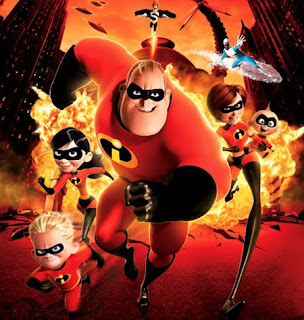
The Incredibles from Pixar Animations Studio (Makers of Toy Story, Finding Nemo, etc) is one of the most entertaing films for young and older audiences.
The look and aesthetics are impressive, it’s well directed, the plot strong and the themes significant.
From IMDB:
Mr. Incredible is a superhero; or he used to be, until a surge of lawsuits against superheroes submitted by the people they’ve saved forced the government to hide them in witness protection programs so they could lead normal, anonymous lives. Now known exclusively by his secret identity, Bob Parr, he lives with his wife Helen, formerly Elastigirl, and their three children Violet, Dash, and Jack Jack. He works as an insurance claims specialist, and he’s fed up with his pushy boss and his immoral profession, but his wife’s worked too hard to build a normal life for her family to abide his nostalgia for heroism. When Mr. Incredible’s offered the chance to play the role of hero again by a mysterious informant, he jumps at the opportunity, but when it turns out to be a trap set by an old nemesis he had a hand in corrupting, the whole family must reveal themselves to save Mr. Incredible and countless innocents.

The Incredibles from Pixar Animations Studio (Makers of Toy Story, Finding Nemo, etc) is one of the most entertaing films for young and older audiences.
The look and aesthetics are impressive, it’s well directed, the plot strong and the themes significant.
From IMDB:
Mr. Incredible is a superhero; or he used to be, until a surge of lawsuits against superheroes submitted by the people they’ve saved forced the government to hide them in witness protection programs so they could lead normal, anonymous lives. Now known exclusively by his secret identity, Bob Parr, he lives with his wife Helen, formerly Elastigirl, and their three children Violet, Dash, and Jack Jack. He works as an insurance claims specialist, and he’s fed up with his pushy boss and his immoral profession, but his wife’s worked too hard to build a normal life for her family to abide his nostalgia for heroism. When Mr. Incredible’s offered the chance to play the role of hero again by a mysterious informant, he jumps at the opportunity, but when it turns out to be a trap set by an old nemesis he had a hand in corrupting, the whole family must reveal themselves to save Mr. Incredible and countless innocents.


Thursday, June 3, 2010


Internet has brought a dynamic and open source of using of graphics stuff. Cartoon and animations are the part of that. Digital animations are designed using software tool separately for 2-D and 3-D animations. There are many websites do business related to graphics, animation and websites. They have many free Animations in Animations Library. The animations are in different forms stored in website library or catalogue. There are digital greetings, postcards, mailers, buttons, emotional faces, and shapes are animated. While browsing the Animation Library, you can listen to attractive music by using the Jukebox also. So that can be used in your purpose. You can search for free animations using the search box provided in many websites. They offer thousands of free clip art images and the animation version of the same images. The catalogue is designed in alphabetic sequence, or thumb nail pattern with ascending order. So a user can easily find the desired animations. Free animations can be searched by typing the word connected to the name of the animations.
Types of Free Animations
Typical 2-D and 3-D animations are available freely from downloadable websites. There are several models of shapes are available in 3-D form. You can use the downloaded animation in your mobile, computer, laptops, palmtops, I-pods etc. There is some hub in Internet, where you can avail the animation files. To navigate the animation file you need to use the interface designed. All the animations, graphics and 3D animated file are gif, swf format that are free to download and use on your websites and computer desktops.The animated Buttons, Bullets, Dividers and Arrows are web design stuffs.
How to download
Once you enter to the specific websites, there are options for free download files, music, animations and graphics etc. For downloading you be required to be a user of the website. There will be a registration entry page that will allow you to enter your name, user name, password, email ID, Telephone number etc. Once you've entered the detail, an email will go to your email inbox for a verification of valid email Id holder. That email provides a code to be entered for the first time of entry. Indirectly the website can trace you as a user, who uses the free stuff from Internet. Later on you will be interested for more valued animations fro their website. That record will help them for the business an all.Internet has brought a dynamic and open source of using of graphics stuff. Cartoon and animations are the part of that. Digital animations are designed using software tool separately for 2-D and 3-D animations. There are many websites do business related to graphics, animation and websites. They have many free Animations in Animations Library. The animations are in different forms stored in website library or catalogue. There are digital greetings, postcards, mailers, buttons, emotional faces, and shapes are animated. While browsing the Animation Library, you can listen to attractive music by using the Jukebox also. So that can be used in your purpose. You can search for free animations using the search box provided in many websites. They offer thousands of free clip art images and the animation version of the same images. The catalogue is designed in alphabetic sequence, or thumb nail pattern with ascending order. So a user can easily find the desired animations. Free animations can be searched by typing the word connected to the name of the animations.
Types of Free Animations
Typical 2-D and 3-D animations are available freely from downloadable websites. There are several models of shapes are available in 3-D form. You can use the downloaded animation in your mobile, computer, laptops, palmtops, I-pods etc. There is some hub in Internet, where you can avail the animation files. To navigate the animation file you need to use the interface designed. All the animations, graphics and 3D animated file are gif, swf format that are free to download and use on your websites and computer desktops.The animated Buttons, Bullets, Dividers and Arrows are web design stuffs.
How to download
Once you enter to the specific websites, there are options for free download files, music, animations and graphics etc. For downloading you be required to be a user of the website. There will be a registration entry page that will allow you to enter your name, user name, password, email ID, Telephone number etc. Once you've entered the detail, an email will go to your email inbox for a verification of valid email Id holder. That email provides a code to be entered for the first time of entry. Indirectly the website can trace you as a user, who uses the free stuff from Internet. Later on you will be interested for more valued animations fro their website. That record will help them for the business an all.